



A drone wiring harness looks simple. In truth, it decides how safely your drone delivers power and data. Wrong wire size, weak connectors, or poor routing can cause heat, signal noise, or a mid-air power loss.
This guide goes deeper than the basics. It is written for engineers, OEM buyers, and sourcing teams working on commercial and industrial UAVs as well as smaller platforms. You will learn what a harness is made of, how to read key specs, and how to choose a drone power cable harness with confidence.
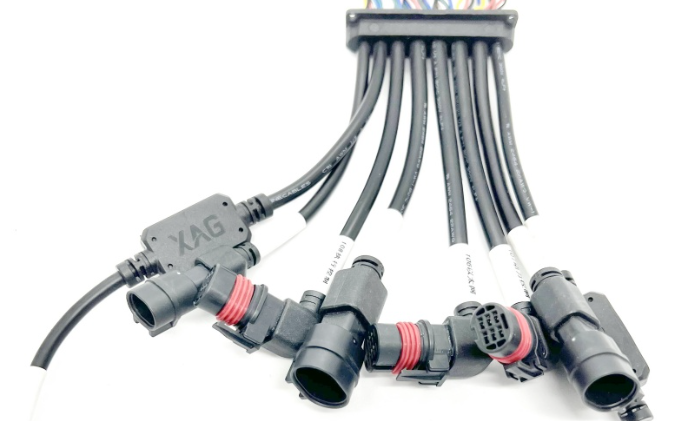
A drone wiring harness is a set of wires, connectors, and protective parts built into one unit. It is made to a set layout. It links the battery, power board, speed controllers, motors, flight controller, and payload.
You will see several names for it:
Each part has a job. A weak part can fail the whole unit.
Wire Size and Current: Illustrative Reference Values
Wire size is shown as AWG. A lower number means a thicker wire. Thicker wire carries more current and runs cooler.
The values below are illustrative references for short runs of flexible silicone wire. They are not fixed design limits, and they should not be copied straight into a design. Real limits depend on the wire specification, heat, bundle size, and airflow.
Final conductor sizing should be verified based on wire specification, allowable temperature rise, voltage drop, ambient temperature, bundle size, airflow, duty cycle, and applicable standards. Keep a safety margin, and do not run a wire at the top of its range for long periods.
Every conductor wastes a little power as heat. Voltage drop depends on conductor resistance, total circuit length, current, temperature, and connection resistance at every connector and terminal. Longer and thinner wire drops more voltage and generates more heat.
Here is one illustrative case, not a design rule. Take copper wire at about 20 °C, with a total conductor length of 1 meter (positive and negative leads combined, so 0.5 m each) carrying 30 A:
12 AWG has about 5.2 milliohms of resistance per meter, so the drop is about 0.16 V.
18 AWG has about 21 milliohms per meter, so the same current drops about 0.63 V, with far more heat in the wire.
Real harnesses will differ. Copper resistance rises as the wire heats up, and connectors and crimps add resistance of their own, so the actual drop is usually higher than a bare-wire estimate.
How much drop is acceptable depends on the specific circuit and equipment. A high-current battery circuit, avionics supply, sensor line, and communication circuit can each have different requirements. Some designers use a percentage target as a starting point, but there is no single figure that applies to every drone. Set the limit from the needs of the equipment on the circuit.
Insulation affects weight, flexibility, and safety.
Many light UAV builds use silicone wire. Industrial, commercial UAV, and harsh-environment applications often require more robust cable materials.
The connector is often the weakest link. Heat usually builds at poor joints, not in the wire.
Common hobby-grade power connectors such as XT30, XT60, and XT90 are familiar examples, but commercial and industrial UAVs draw on a much wider range of connector categories:
What to Check Beyond a Rating
A connector's rating on paper is usually a best-case figure measured under set test conditions. Real limits fall when a connector runs warm, is poorly crimped, or sits in a bundle with other heat sources. Choosing one size larger is not a substitute for checking the details:
Continuous and peak current: compare the rated current with both the steady load and short peaks, such as motor start-up or climb.
Contact resistance and temperature rise: higher resistance at the contact creates heat. Check the manufacturer's temperature-rise data at your operating current.
Derating: apply derating for ambient temperature, multi-pin loading, and enclosure conditions, as the connector manufacturer specifies.
Wire-size compatibility: confirm the terminal is designed for your wire gauge and insulation diameter, and that the crimp suits it.
Vibration and locking mechanism: choose a locking style suited to the vibration profile, since friction fits can work loose in flight.
Mating cycles: compare the rated number of cycles with how often the harness will be connected and disconnected.
Environmental protection: check sealing, temperature range, and corrosion resistance against the operating environment.
Pin count, spacing, and mating part: match the counterpart exactly.
Motors and speed controllers create electrical noise. That noise can disturb GPS, compass, radio, and video.
Helpful habits:
Twist battery positive and negative leads together.
Route signal wires away from motor leads.
Cross power and signal wires at right angles.
Plan the shield termination as part of the overall design.
Shield termination and grounding are not one-size-fits-all. The right approach depends on the signal type, frequency, EMC requirements, connector design, and the overall system grounding architecture. Grounding at one end, at both ends, or through the connector shell can each be correct in different systems, so follow the system design and test for noise rather than applying a fixed rule.
Drones shake in flight. Constant motion wears wire over time. Weather adds more stress.
Ingress protection (IP) ratings, such as IP65 or IP67, describe how well a rated connector, enclosure, or component resists dust and water under specified mating and installation conditions. They do not automatically apply to a whole wiring harness. A harness built with an IP67-rated connector is not necessarily IP67 as a complete assembly, since the cable entry, terminations, splices, and mating state all matter. If your drone flies outdoors, confirm what is rated and how, and specify sealing for the full assembly where it is needed.
Good harness design is a series of balanced decisions. Pushing hard on one goal usually costs something elsewhere.
Weight vs. current capacity. Extra weight cuts flight time, but cutting wire size too far adds heat and voltage drop. Use the thinnest wire that stays within its temperature and voltage-drop limits, cut lengths to what the layout needs, and skip unnecessary adapters.
Flexibility vs. abrasion resistance. Very flexible insulation, such as silicone, is easy to route but can scrape through more easily. Tougher materials resist wear but may be stiffer. Match the choice to where the harness will move and rub.
Connector retention vs. serviceability. Strong locking keeps connections secure in vibration, but can slow field replacement. Choose the lock style that fits how often the harness will be serviced.
Shielding vs. weight. Shielding protects sensitive signals but adds weight, stiffness, and termination work. Shield the lines that need it, such as video, radio, and sensor lines, rather than everything.
Compact routing vs. minimum bend radius. Tight frames push harnesses into tight bends, which stresses wires and terminations. Respect the minimum bend radius and add strain relief rather than forcing the route.
Do not remove strain relief to save grams.
A good harness is tested and inspected before it ships. Ask a supplier about these checks:
Also ask whether the maker follows workmanship standards such as IPC/WHMA-A-620 and works under a quality management system such as ISO 9001. Many buyers also ask for RoHS-compliant materials.
A custom UAV cable harness can remove extra joints and adapters. Fewer joints mean fewer places to fail.
Drawings or photos of the drone layout
Wire lengths and routing paths
Connector part numbers
Voltage and current needs
Operating temperature and weather
Order quantity and timeline
Test and compliance needs
SINNHONG ELECTRONICS manufactures custom wire harnesses and cable assemblies for drones, UAVs, and other electronic equipment. Our manufacturing facilities are in China and Vietnam, and we support projects from prototype through mass production.
What we build and how we work:
Engineering review. We review your engineering drawings and pinouts before production, so layout, connector, and wire questions are settled early.
Power and signal harnesses. We build high-current power harnesses as well as signal harnesses, with compact connector integration for space-limited airframes.
Weight and vibration. We work with lightweight cable construction and vibration-resistant assembly design to help balance weight, durability, and serviceability.
Overmolding. Overmolding is available where it improves strain relief, sealing, or durability.
Inspection and testing. Every harness receives 100% electrical testing, and we apply the crimp, retention, and labeling checks listed above.
Workmanship and quality system. We build to IPC/WHMA-A-620 workmanship standards under ISO 9001 quality management.
We can start from a drawing and a pinout, or work with you to refine a design as it moves from prototype to production.
What wire size should I use for the main battery lead? It depends on peak and continuous current, length, temperature rise, and voltage drop. Mid-size drones often use wire in the 12 to 14 AWG range, but treat that as a starting point and verify it against the actual current draw and the wire specification.
Why does my connector get hot? Common causes are a loose fit, a poor crimp, worn contacts, or a load too close to the rating. Check the crimp and contact condition, review the current against the connector's rating and derating, and confirm the connector suits the load.
Do I need shielded cable? Use it where the design calls for it, such as video, radio, and sensor lines near motors. Battery power lines usually do not need shielding, but the right choice depends on the system and its EMC requirements.
How often should I inspect the harness? Check before each flight. Look for loose plugs, worn insulation, and discoloration.
A good harness is more than wires in a bundle. Wire size, insulation, connectors, shielding, and routing all work together. Get these right and your drone runs cooler, quieter, and safer.
Start with your power needs. Add margin. Protect against vibration and weather. Then test before you commit.
If you are an OEM or commercial UAV customer, we welcome your technical information for engineering review and quotation. Please send:
Drawings
Connector part numbers
Pinouts
Cable length
Voltage and current requirements
Operating environment
Annual quantity
Testing or compliance requirements
Our engineering team will review your requirements and get back to you with feedback and a quotation.
 sales@sinnhong.com
 Whatsapp: 8613543700314
 Send us message